可変要素ではなく、不変要素から始めましょう
ClickFix型の攻撃は、 2025以降、1~2か月ごとに変化し続けています。 新しいルアー、新しい投下方法、新しいペイロード。 MITREは、この手法をATT&CKに「 T1204.004, User Execution: Malicious Copy and Paste」として追加しました( 18 March 2025)。この手法のハンターにとっての特徴は、被害者が手動で実行を行うという点です。 攻撃者の手口は、相手を説得することまでです。偽のCAPTCHA、偽のエラーダイアログ、Win+Rキーを押して貼り付けるよう指示するなどです。
あるお客様から、現在の変異株に対しても補償の対象となるかどうかと尋ねられました。 変種を一つずつ追いかけていても、結局は無駄な努力になってしまいます。というのも、今月のバージョン用のコンテンツが完成する頃には、すでに新しいバージョンが登場しているからです。 つまり、このプレイブックは、変わらない部分に焦点を当てたものでした。 どのような手口であれ、ほぼすべての手口は同じ結末を迎えます。つまり、ユーザーがWindowsの「ファイル名を指定して実行」ダイアログにコマンドを入力するか、貼り付けるのです。
ユーザーが入力する場所を特定すれば、どのバリエーションであるかは問題ではなくなります。
RunMRUが最適な情報源である理由
Windows では、「ファイル名を指定して実行」ダイアログに入力された内容が、以下の場所に記録されます:
HKEY_CURRENT_USER\Software\Microsoft\Windows\CurrentVersion\Explorer\RunMRU各コマンドは、a、b、c といった名前の文字列値として格納され、使用された順序は MRUList 値として記録されます。 これはユーザーごとに設定され、再起動後も設定が保持されますが、ほとんどの環境では、誰もこれを確認していません。
以下の3つの特徴が、ここを狩猟に適した場所としています:
- これは、単なる実行だけでなく、意図も記録するものです。 RunMRUにおけるコマンドとは、人が意図的に入力または貼り付けたものです。 これは、プロセス作成フィードよりもはるかに高い信号対雑音比です。
- これは遡及的なものです。 これは歴史の記述ですので、調査の対象は、あなたのツールが監視していた間に起きた出来事だけに限定されるわけではありません。
- クエリの実行コストは安いです。 レジストリ値が1つ、質問が1つ、エージェント側の展開は不要、新しいテレメトリパイプラインも不要です。
ピボット
大規模な資産全体でその値を検索したところ、数万件の結果が得られました。 その瞬間こそ、多くの検索が行き詰まる瞬間であり、クエリそのものよりも検索手法が重要になる場面なのです。
キーワードで絞り込むのではなく、フィルタは「 」の動作()に基づいて絞り込みを行いました。これは、エステートの外へアクセスして何かを取得するコマンドのことです。 ペイロードの回収は、ClickFixが依存しているステップであるため、当初の仮説を検証するには適切なフィルタでした。 また、まったく別の種類の問題も検出できるのです。
ある一行がひときわ目につきましたが、それはドメインやツールのせいではありませんでした。 決定的な要因となったのは、2つの些細な点でした。それは、「-u」フラグと、脆弱性データを参照する出力ファイル名です。
では、curl、 -u を実行すると、認証情報は「ユーザー名:パスワード」の形式でインラインで指定されます。 ユーザー名とパスワードは、数ヶ月前に入力されたままの形で、レジストリの中に平文のまま保存されていました。 その一行を書いた人は、ある問題を解決しようとしていたのです。つまり、調査結果のエクスポートファイルを抽出し、ローカルに保存し、それを開くという作業です。 Windowsが記憶しているという事実について、誰も考えていませんでした。
15分、そしてそれを可能にしたもの
ノートブックの骨組みはすでに存在しており、それがコピーする価値のある部分です。 確認しようと決めてから5分後には、データが読み取れる状態になっていました。 15分以内に平文のパスワードが確認され、直ちにチームに連絡が入り、認証情報とエンドポイントの両方を確認するよう求められました。 チケットが発行され、1時間以内にパスワードが更新されました。
その速さは、クエリがすでに記述されていたことに起因するものであり、発見が劇的だったからではありません。
なぜ「行き先」が「資格」よりも重要だったのか
その認証情報では、お客様自身の環境を開くことはできませんでした。 そのシステムは、サードパーティの脆弱性管理ポータルにログインしました。このポータルには、環境全体にわたるパッチが適用されていないすべての脆弱性の登録情報が保管されています。
スキャンや推測を行う必要がなく、侵入経路を見つけるために痕跡を残す必要もない攻撃者です。 彼らはそのリストを読むことができます。 また、そのアカウントはサードパーティのプラットフォーム上に存在していたため、その更新権限が誰にあるのかという問いには明確な答えがありません。まさにこのような状況下で、認証情報は数ヶ月もの間、更新されないまま放置されてしまうのです。
ベライゾンの 2026 番の番号に関しては、リスクはその方向に向かっています。 情報漏洩事件における第三者の関与は前年比 60%増加し、現在では事件のほぼ半数で第三者が関与しています。また、第三者組織においては、脆弱なパスワードや権限設定の不備といった問題について、全発見事項の半数において、その修正に8ヶ月近くを要しています。
うまくいかなかった点
キーワードから調べ始めるのが当然でしたが、それは行き止まりでした。 「実行履歴」で「https」、「PowerShell」、または「cmd」を検索しても、結果が全く表示されないか、あるいは表示される結果が多すぎて使い物になりません。 これら3つはいずれも、攻撃者にとっては難なく難読化できるものであり、また、正当な用途においても常に使用されています。 「このような単純な指標は偽装されやすく、価値をもたらすことはめったにありません」と、これを発見したHuntIQのハンターは述べました。
この区別は、今回の調査の枠を超えて一般化できるものであるため、正確に述べておく価値があります。 キーワードフィルターは、 に対し、 にどの文字列が存在するかを問い合わせます。 行動フィルターは、「このコマンドは何をしようとしているのか」と問いかけます。 1つ目は回避しやすく、騒音が激しいです。 2つ目は、一行ずつ読むのにちょうどいい大きさです。
ご自身で実行してみてください
- すべてのエンドポイントから「実行」ダイアログの履歴を取得してください。 Taniumでは、これは1つの質問となります:
すべてのエンティティから「データを含むレジストリキーの値名」[HKEY_CURRENT_USER\Software\Microsoft\Windows\CurrentVersion\Explorer\RunMRU]を取得します - キーワードではなく、外部からの検索用にフィルタを設定してください。 エステートの外部から何かを取得するコマンド:HTTPクライアント、ファイル転送ユーティリティ、リモートリソースを取得するスクリプトインタプリタなどです。 そのセットは、読みやすいほど小さいです。
- 認証フラグについて、サバイバーを確認してください。 実際には、curl では -u および --user、さまざまなクライアントでは -p および --password、Windows ユーティリティでは /user:、そして user:pass@host という形式で認証情報を authority セクションに含む URL がこれに該当します。
- サードパーティの宛先を優先して扱ってください。 他社のプラットフォームへの認証情報は、組織内の誰もその更新管理を担当していないものです。
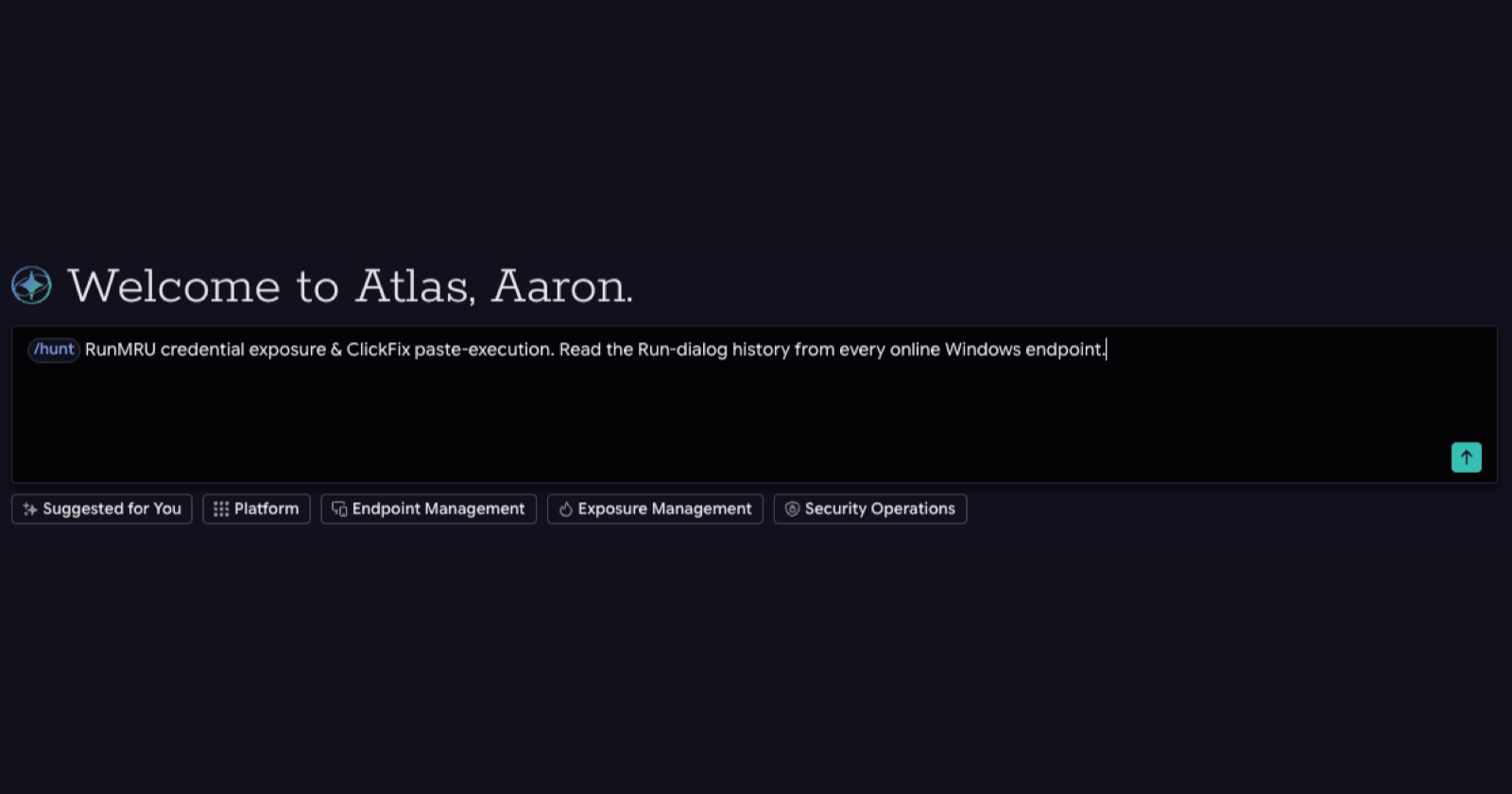
- Tanium Atlasをご利用の方は、以下のコマンドを実行してください: /hunt すべてのエンドポイントにおいて、Windowsの「ファイル名を指定して実行」ダイアログの履歴(RunMRUレジストリキー)を確認し、インターネットからデータを取得し、インラインでパスワードを含むコマンド(例:curl -u user:pass)が入力されていないかご確認ください。 ホスト、ユーザー、および宛先を報告し、パスワードは伏せてください。
前提条件と制限事項
- エンドポイントはオンライン状態である必要があります。 これは、レジストリの履歴データではなく、リアルタイムのレジストリを読み取ります。
- では、現在ログインしているユーザーのみを取得できます。。 RunMRUはHKCUに存在するため、共有エンドポイントへの1回のアクセスで、1人の履歴が返されます。
- 共同管理やシフト制で運営されている団地では、一日の異なる時間帯に狩りを再度行ってください。 ユーザーがログインするたびに追加のユーザーを検知することになりますが、1回のスキャンではその大半を見逃してしまいます。
- これは入力された証拠であり、実行された証拠ではありません。 RunMRUでコマンドが入力されました。それが正常に実行されたかどうかは、また別の問題です。
- 不在は何も証明しません。 このキーはクリアすることができ、多くのユーザーは「実行」ボックスをまったく使用しないこともあります。
ATT&CKのマッピング
| テクニック | この狩りにおける役割 |
|---|---|
T1204.004 悪意のあるコピー&ペースト | そのプレイブックが発見するために考案された戦術です。 ATT&CKに追加されました 18 March 2025。 |
レジストリ内の T1552.002 個の の認証情報 | 何が発見されたのでしょうか。 RunMRU は、平文の認証情報を保持するレジストリの場所です。 |
T1105 Ingress ツールの移行 | このフィルターが反応する動作です。 外部リソースからの取得は、個別に扱う価値のあるステップです。 |
T1059.001 / .003 コマンドおよびスクリプトインタプリタ | ユーザーがEnterキーを押すと、貼り付けられたコマンドがどのように実行されるか。 |
お客様が変更された点
有用性の順に、3つのポイントをご紹介します。
- 彼らはパスワードを変更しました。
- 彼らは、それまでその行為を行っていた利用者たちに指導を行いました。
- そして、彼らはそれが存在していた理由を取り除きました。
「実行」ボックスにパスワードを入力する必要があった手動でのリクエストは、同じ脆弱性データを収集する、適切に認証されたAPI呼び出しに置き換えられました。 最初の2つは、ある事案に対処するものです。 3つ目は、そのクラスを修正するものです。
まとめ
ある仮説に基づいて作成されたコンテンツは、その仮説の範囲外にある何かを常に見つけ出しますが、それは単なる偶然ではありません。 特定の技法を対象とした探索では、その技法の基盤を共有する他の要素も、やはり浮き彫りになります。 ユーザーが行動する場所で検索を行い、文字列ではなく行動に基づいてフィルタリングし、返ってきた結果を確認します。
今週、ご自身の組織に対して問いかけるべき質問は、その実績が確かなものかどうかということではありません。 現在、それらは平文でそこに記録されています。
次の脅威に先手を打つ
- Tanium Security OperationsとHuntIQが、キーワード検索では見逃してしまうものをどのように検知するのか、その仕組みをご確認ください。
- Tanium Atlasが、探索仮説をいかに迅速に全フリート規模の掃討作戦へと転換させるかをご覧ください。
外部の図表の出典
「Verizon 2026 データ侵害調査レポート」(Help Net Security 経由)、 20 May 2026。 helpnetsecurity.com/2026/05/20/verizon-2026-dbir-findings/ (新しいタブで開きます)
MITRE ATT&CK T1204.004 「ユーザー実行:悪意のあるコピー&ペースト」。attack.mitre.org/techniques/T1204/004/ (新しいタブで開きます) 「 18 March 2025」を追加しました。